
TL;DR

Get the little things that make your day delivered free with Prime
- Fast, free delivery on millions of items
- Prime Video, Amazon Music and more included
- Member-only deals all year
Building an AI workstation used to be cheaper, but component shortages and bulk buying have shifted the balance. Now, your decision depends on cost, control, and how much you value tuning versus plug-and-play convenience.
Imagine powering up your AI project, ready to go, in just minutes. No sourcing parts, no troubleshooting BIOS, no waiting days for delivery. That’s the promise of a prebuilt AI workstation. But is it the best choice for you? Or does building your own still hold the edge—especially when you want control, customization, or maximum value?
This article cuts through the hype, comparing the real costs, performance, and upgrade paths of both options in 2026. Whether you’re a developer, researcher, or hobbyist, understanding these tradeoffs will help you choose the right machine for your specific needs.
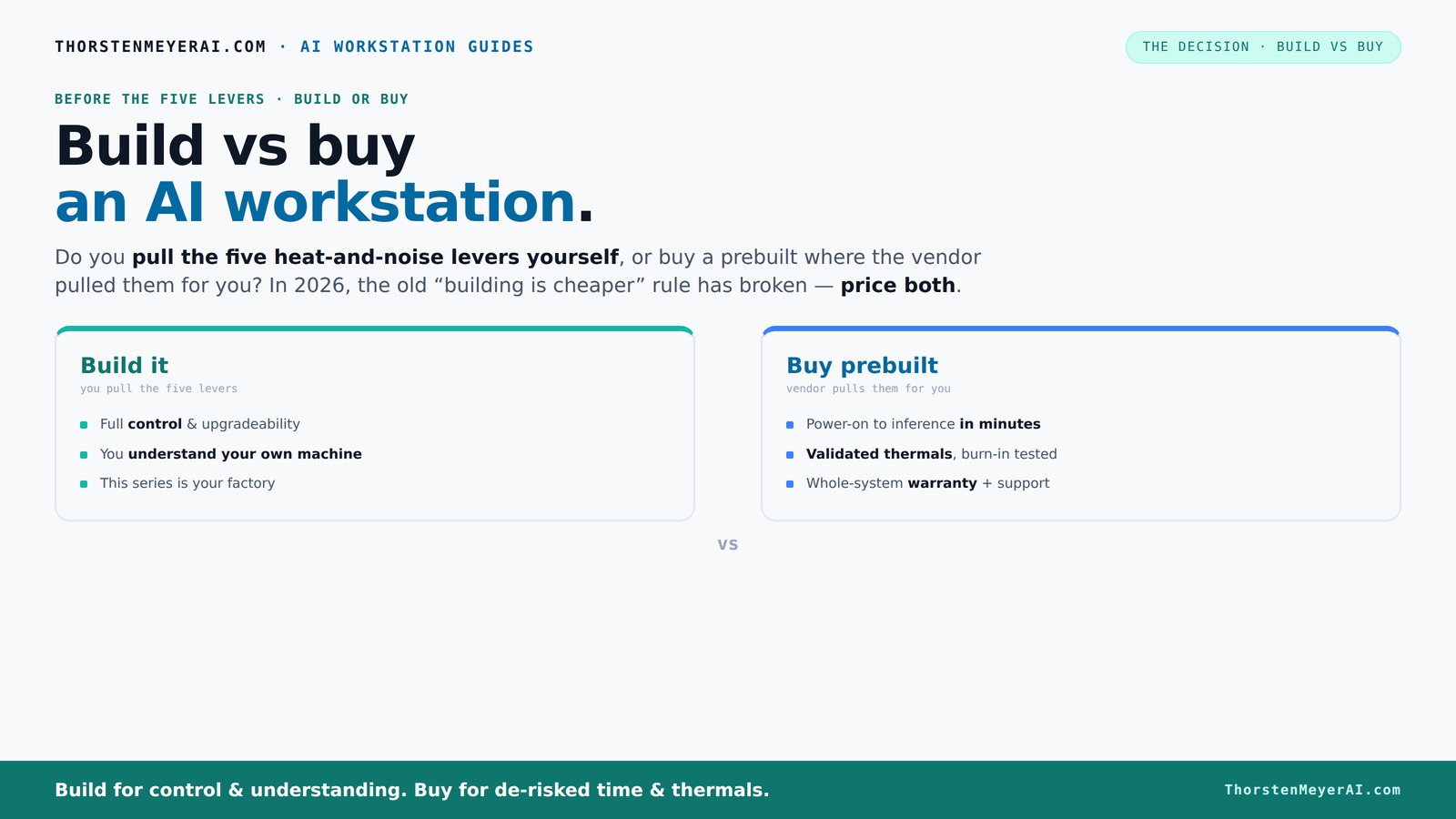
Build vs buy
an AI workstation.
The real question behind this whole series: do you pull the five heat-and-noise levers yourself, or buy a prebuilt where the vendor pulled them for you? And in 2026, the old “building is cheaper” rule has broken. Match your situation in Part 3.
Key Takeaways
- Component shortages in 2026 make prebuilt AI workstations competitive or cheaper than DIY options.
- Thermal management is a key reason to buy a prebuilt—vendor tuning saves time and reduces noise and heat.
- Performance depends on workload; both build and buy can deliver top results with the right hardware choices.
- Upgradeability varies: DIY offers more control, but proprietary prebuilts can limit future upgrades.
- Support and warranty are often overlooked but critical for mission-critical AI workloads.
As an affiliate, we earn on qualifying purchases.
Why the old rule 'Build is Cheaper' no longer applies in 2026
Building your own AI workstation used to be the clear money-saver. But recent shortages and bulk buying have changed that. Components like DDR5 RAM and high-end GPUs now cost more, often $250 more than last year. In fact, a typical DIY build that used to cost around $1,000 now easily hits $1,250 or more, before even adding an OS.
Meanwhile, major vendors—like Lambda or BIZON—have secured bulk discounts and optimized their supply chains. They can offer systems at prices that are close to, or even below, what you'd pay piecing together parts yourself. So, the age-old wisdom that building always saves money? It’s not true anymore. You need to compare prices for your specific setup — it’s a different game now.
This shift matters because it forces a reevaluation of where your money is best spent. The traditional advantage of DIY—saving costs—has diminished, and in some cases, the effort and time invested in building may not justify the marginal savings. For more guidance, see Build vs Buy a Prebuilt AI Workstation.
As an affiliate, we earn on qualifying purchases.
The heat and noise: who pulls the levers?
Running an AI workstation is like managing a tiny furnace—heat and noise are your constant companions. When you buy a prebuilt, the vendor is the one pulling the levers—undervolt the GPU, optimize airflow, tune fans, even water-cool if needed. They validate the system to run cool and quiet under heavy loads, often with 24–48 hours of burn-in testing. To learn more about building your own cooling system, visit Build vs Buy a Prebuilt AI Workstation.
Building your own means you get to pull every lever yourself. You pick a quiet GPU, match it with a high-quality cooler, design airflow, and tune the fans exactly for your environment. It’s a satisfying challenge—if you enjoy thermal engineering and fine-tuning. But it’s not for everyone.
This difference impacts your overall experience: a vendor-tuned system minimizes the time and effort you need to spend on thermal management, ensuring quieter operation and more reliable thermal performance. For DIY builders, the tradeoff is the time invested in testing and tuning—if done well, it can result in a quieter, cooler system, but it also risks thermal issues if not managed carefully. The decision hinges on whether you value convenience and reliability over the satisfaction and potential performance gains of manual tuning.
high performance workstation build kit
As an affiliate, we earn on qualifying purchases.
As an affiliate, we earn on qualifying purchases.
Performance for your AI workload: which setup wins?
Performance depends on your AI task—training big models, fine-tuning, or running local inference. Both prebuilt and custom setups can deliver top-tier GPU power, but the details matter. For tailored advice, see Build vs Buy a Prebuilt AI Workstation.
In 2026, some prebuilt systems are optimized with AI-specific hardware accelerators, like NPUs, that reduce power consumption and improve efficiency. But DIYers can often tailor their setup—choosing the exact GPU, RAM, and cooling—to squeeze out more performance or efficiency.
Understanding these distinctions helps you align your hardware choices with your workload's demands. For instance, if your focus is on training large models, a system with multiple high-end GPUs and advanced cooling might be necessary. Conversely, for inference or lighter tasks, a well-chosen single GPU can suffice. The key is recognizing that both options can deliver excellent performance, but the path to optimization varies depending on whether you buy a preconfigured system or assemble your own.
As an affiliate, we earn on qualifying purchases.
Cost comparison: what’s the real price today?
Prebuilt systems often cost more upfront—sometimes $200–$500 more—because you’re paying for assembly, validation, and warranty. But they can also be cheaper than DIY if component prices are high and supply chain issues persist. For consumer advice, check Build vs Buy a Prebuilt AI Workstation.
For example, a prebuilt like Lambda’s AI workstation might cost around $2,200 but includes custom cooling, testing, and support. Building your own with similar specs could cost close to that, but you’ll spend extra time and effort tuning and troubleshooting.
This comparison isn’t just about sticker price. It involves evaluating the total cost of ownership, including time spent on assembly, troubleshooting, and potential downtime. In 2026, the financial gap between build and buy is narrower, and often the decision hinges on the value you place on convenience versus customization and control.
Upgradeability and future-proofing: can you change things later?
Prebuilt systems often come with some limitations—proprietary motherboards, non-standard power supplies, or tight space for upgrades. Upgrading a GPU or adding RAM can be tricky, especially if the vendor uses custom parts.
Building your own gives you full control. You choose a standard ATX case, motherboard, and PSU, making future upgrades straightforward. Want a second GPU in a year? Swap it out easily. Need more RAM or storage? No problem.
However, proprietary designs can restrict upgrade paths or make future modifications costly and complicated. For example, some prebuilt systems might have non-standard layouts or soldered components that can't be upgraded. Recognizing these limitations is crucial for planning long-term investments. If long-term flexibility and ease of future upgrades are priorities, DIY offers a clear advantage, but always verify compatibility and upgrade options before purchasing or building.
Warranty, support, and downtime: what risks do you run?
Prebuilt systems come with manufacturer support—often 1 to 5 years—covering hardware failures and support calls. If your AI workstation crashes mid-training, the vendor’s support can save you days of troubleshooting. Learn more about support options at Nail Care Hub.ilures that could otherwise halt your work for extended periods.
DIY builds shift the support burden to you. You’ll need to troubleshoot, replace parts, and deal with compatibility issues. While this can be manageable for experienced users, it introduces potential downtime and stress, especially if you’re working on time-sensitive projects. Moreover, DIY repairs can sometimes be costly and time-consuming, especially if proprietary parts are involved.
For mission-critical workloads, the peace of mind from a prebuilt’s warranty and support is often worth the extra cost, reducing the risk of unexpected downtime. Conversely, for hobbyists or seasoned professionals, taking on support responsibilities can be acceptable, provided they have the skills to manage issues quickly. Ultimately, the choice impacts your system’s reliability and your ability to maintain uptime under pressure.
Who should build, who should buy? Making the right choice
If you love tinkering, want maximum control, and have the time, building your own AI workstation is rewarding. You can customize every part, tune thermals, and upgrade as needed.
But if your priority is speed, reliability, and hassle-free operation, a prebuilt system is often the smarter choice. Especially if you’re new to AI hardware or need something ready to run out of the box.
In 2026, consider your budget, technical skill, and long-term plans. The perfect machine depends on what you value most: control or convenience. Building offers deep customization and potential savings, but with more effort and risk. Buying provides peace of mind, faster deployment, and less hassle, at a potentially higher initial cost.
Your checklist before buying or building
- Define your workload: training, inference, or content creation?
- Set a budget—consider total cost, not just initial price.
- Assess your technical skills and time availability.
- Check component prices and availability today.
- Consider future upgrade plans and support needs.
- Compare vendor offerings and warranty options.
Frequently Asked Questions
Is it cheaper to build or buy an AI workstation in 2026?
Thanks to component shortages and bulk buying, prebuilt workstations are often as cheap or cheaper than building your own, especially for high-end AI setups. Always compare prices for your specific configuration before deciding. The tradeoff is that the savings from DIY are shrinking due to increased component costs, and the time investment can be significant. If you value time and reliability, a prebuilt may be more cost-effective overall, even if the initial price appears higher.
Which option gives better performance for the money?
Both can deliver top performance. Prebuilts are optimized and validated by vendors, ensuring consistent results and often better thermal management. DIY allows for tailored configurations, potentially squeezing out more performance if you know how to optimize hardware and cooling. The best choice depends on your workload—training large models might benefit from a multi-GPU setup, while inference tasks may be adequately served by a single high-end GPU. The key is understanding how each approach aligns with your specific performance needs and tuning capabilities.
Do I need a GPU with a lot of VRAM for local AI models?
Yes. Larger models and training require GPUs with more VRAM—24GB or more is common for serious AI work. Insufficient VRAM can bottleneck your workload, forcing you to reduce model size or split tasks across multiple GPUs, which adds complexity. Matching your GPU to your workload ensures you avoid performance bottlenecks and makes efficient use of your hardware investment. For inference of smaller models, less VRAM may suffice, but for training or large models, investing in a GPU with ample VRAM is essential.
Will a prebuilt limit my future upgrades?
Prebuilt systems can sometimes limit upgrade options due to proprietary motherboards, non-standard components, or space constraints. For instance, some vendors solder components or use custom layouts that prevent adding extra GPUs or RAM easily. However, high-end prebuilt systems often provide upgrade paths, but they may be more expensive or less flexible than DIY options. Recognizing these limitations before purchase can help you plan for future needs. If future expandability is a priority, choosing a system with standard components or building your own offers greater control and simplicity for upgrades down the line.
How important are cooling and power supply quality for AI workloads?
Very important. High-performance AI workloads generate significant heat and require stable power delivery. Poor cooling can lead to thermal throttling, reducing performance and risking hardware damage, while inadequate power supplies can cause system instability or failures. Investing in quality cooling solutions—like high-end fans, water-cooling, or optimized airflow—and a reliable, high-capacity power supply ensures your system remains stable during intensive tasks. This is especially critical during prolonged training sessions where sustained performance and hardware longevity depend on proper thermal and power management.
Conclusion
Building or buying your AI workstation in 2026 isn’t just about saving money; it’s about what you value most—control, convenience, or cost. If speed and reliability top your list, a prebuilt is hard to beat. But if you crave customization and long-term flexibility, DIY remains a compelling choice.
Imagine a machine that’s perfectly tuned to your needs, humming quietly in the corner while you focus on the AI models that matter. Whether you build or buy, remember: the best choice aligns with your workload, skills, and future plans. The right machine is out there—ready to power your ideas into reality.
NFL season / tailgating Picks
team gear
As an affiliate, we earn on qualifying purchases.